The Malawi visa application form is completed entirely online through the official eVisa portal at evisa.gov.mw – there is no downloadable PDF form. All applicants must create an account, fill in the digital form, upload documents, and submit electronically. Below you will find a full walkthrough of every section, required documents, common mistakes, and tips for a smooth submission.
What Is the Malawi Visa Application Form?
The Malawi visa application form is an electronic questionnaire hosted on the government’s eVisa portal. It collects personal information, travel details, employment history, and supporting documents. Whether you are applying for a tourist visa, transit visa, or business visa, you use the same online system.
The form replaced the old paper-based process. You cannot download a PDF version to fill by hand – the Department of Immigration accepts only online submissions through the portal.
How to Access the Application Form
Follow these steps to reach the form:
- Visit evisa.gov.mw
- Click “Apply Now” or “New Application”
- Create an account with your email address
- Verify your email through the confirmation link
- Log in and select your visa type
Once logged in, the form opens in a multi-step wizard format. You can save your progress and return later.
Form Sections: What You Need to Fill In
The application form is divided into several sections. Each section must be completed before you can proceed to the next.
Personal Information
This section collects your basic identity data:
| Field | Details Required |
|---|---|
| Full Name | As printed on your passport |
| Date of Birth | DD/MM/YYYY format |
| Nationality | Country of passport |
| Gender | Male / Female |
| Place of Birth | City and country |
| Passport Number | Including expiry date |
| Marital Status | Single / Married / Other |
Tip: Your name must match your passport exactly. Spelling differences between the form and your passport will cause delays or rejection.
Contact Details
Provide a working email and phone number. The immigration department communicates via email, so use an address you check regularly. Include your home address and, if different, your current residential address.
Travel Information
This section asks about your trip:
| Field | What to Enter |
|---|---|
| Visa Type | Tourist / Transit / Business / Diplomatic |
| Purpose of Visit | Brief explanation (e.g., “Leisure tourism”) |
| Intended Date of Arrival | Your planned entry date |
| Intended Date of Departure | Your planned exit date |
| Port of Entry | Kamuzu International Airport (Lilongwe) or other |
| Duration of Stay | Number of days |
| Hotel / Accommodation | Name and address in Malawi |
You must also declare whether you have visited Malawi before and provide details of any previous visa applications.
Employment and Background
The form asks for your current occupation, employer name, and address. Students should list their educational institution. Retired applicants can enter “Retired.”
A background section includes security questions about criminal history, previous visa refusals, and deportation from any country. Answer honestly – providing false information can result in a permanent ban.
Supporting Documents Upload
You must upload scanned copies (not photos taken with a camera) of the following documents:
| Document | Format | Max Size |
|---|---|---|
| Passport bio-data page | JPEG or PDF | 2 MB |
| Passport-size photo | JPEG | 2 MB |
| Return flight ticket | PDF or JPEG | 2 MB |
| Hotel booking confirmation | PDF or JPEG | 2 MB |
| Bank statement (last 3 months) | 2 MB | |
| Yellow fever certificate | PDF or JPEG | 2 MB |
Important: All documents must be clear, legible scans. Blurry photos or partial scans will cause rejection. The system accepts JPEG and PDF formats only.
For a complete list of required documents, see our Malawi visa requirements guide.
Step-by-Step Form Completion Guide
Here is the recommended order for completing the form:
- Create your account – Use an email you check daily
- Select visa type – This determines the fee and required documents
- Fill personal details – Copy directly from your passport
- Enter travel information – Have your flight booking ready
- Add accommodation details – Hotel name and address
- Upload documents – Prepare scans in advance
- Review all entries – Check for typos and errors
- Pay the fee – Credit or debit card (Visa/Mastercard)
- Submit – You will receive a confirmation email
After submission, you can check your application status online through the portal.
Malawi Visa Application Fees
The fee depends on the visa type you select on the form:
| Visa Type | Fee (USD) | Validity | Entries |
|---|---|---|---|
| Transit Visa | $50 | Up to 7 days | Single |
| Single-Entry Tourist | $75 | Up to 90 days | Single |
| 6-Month Multiple Entry | $150 | 6 months | Multiple |
| 12-Month Multiple Entry | $250 | 12 months | Multiple |
| Diplomatic / Official | Free | As specified | As specified |
Payment is made online via credit or debit card. The fee is non-refundable, even if your application is denied. For a detailed breakdown, visit our Malawi visa fees page.
Common Mistakes to Avoid
Applicants frequently make these errors that delay or derail their application:
- Passport validity under 6 months – Your passport must be valid for at least 6 months from your arrival date
- Blurry document uploads – Always submit clear, high-resolution scans
- Name mismatch – The name on the form must exactly match your passport
- Wrong visa type – Selecting tourist when you need business creates complications
- Missing yellow fever certificate – Required if arriving from an endemic country
- Incorrect travel dates – Your arrival date must be after the processing period (minimum 4 business days)
- Camera photos instead of scans – The system requires proper document scans
Processing Time After Submission
Once you submit the form and pay, the standard processing time is a minimum of 4 business days. The official Department of Immigration states 3 working days, but in practice it can take longer during peak travel seasons.
Apply at least 2-3 weeks before your intended travel date to allow for any delays. You can track your application status at any time through the portal.
For full details on processing timelines, see our Malawi eVisa processing time guide.
After Approval: What Happens Next
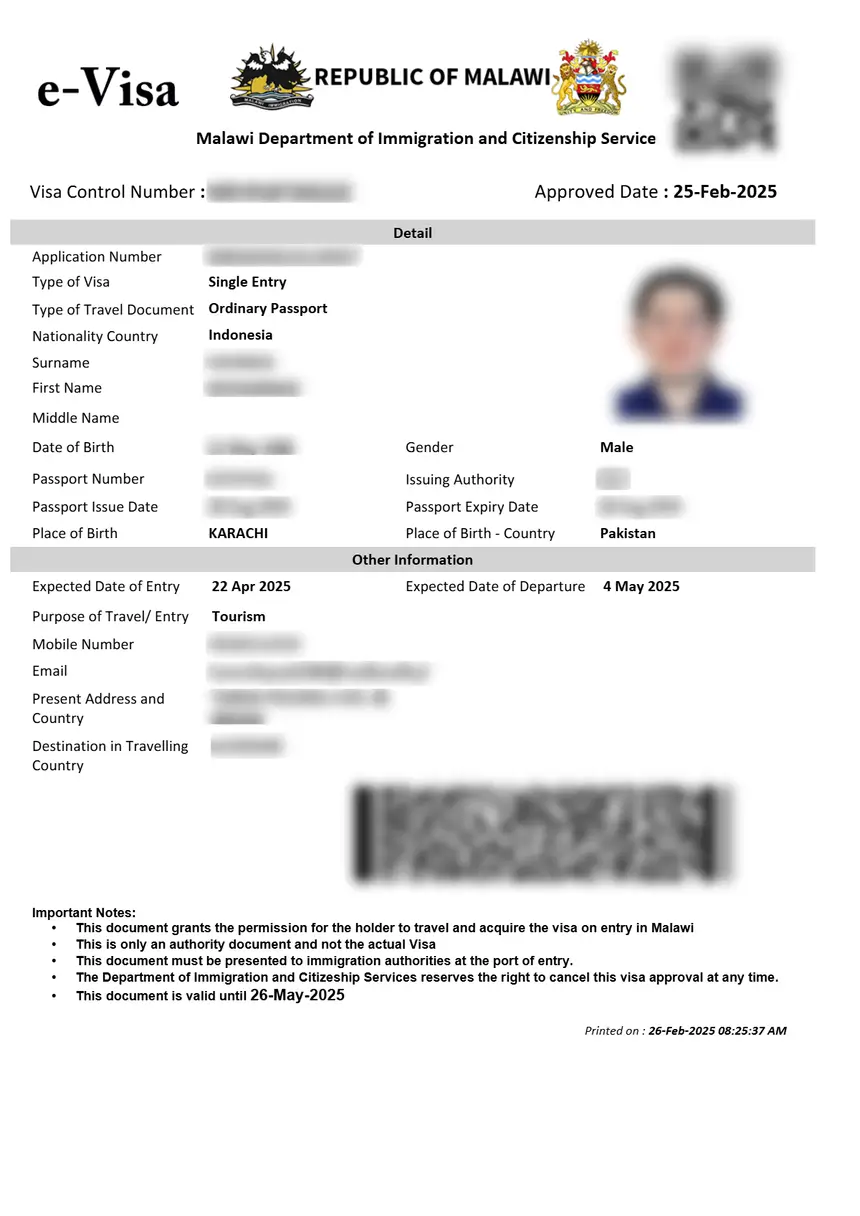
When your application is approved, you receive an email notification. Log in to the portal and download your eVisa approval letter. Print this letter and carry it with your passport when you travel.
At the port of entry in Malawi, present:
- Your valid passport
- Printed eVisa approval letter
- Return flight ticket
- Proof of accommodation
The immigration officer will stamp your passport with the visa. For a complete overview of the entire process from start to finish, read our Malawi eVisa complete guide.
Tips for a Successful Application
- Apply early – Don’t wait until the last minute; processing can take up to 7 business days
- Use a desktop computer – The form is easier to complete on a larger screen
- Prepare documents in advance – Scan everything before starting the form
- Double-check passport number – A single digit error means reapplying
- Save your application ID – You need it to check status later
- Use a stable internet connection – Interruptions can lose unsaved progress
- Keep your email accessible – All communications come via email
Frequently Asked Questions
Is there a downloadable PDF form for the Malawi visa?
No. The Malawi Department of Immigration has moved to a fully digital system. All applications must be submitted online through evisa.gov.mw. There is no PDF form available for download or mail-in submission.
Can I fill out the form on my phone?
Yes, the eVisa portal works on mobile devices. However, uploading documents and filling in detailed fields is easier on a desktop or laptop computer. We recommend using a desktop for the best experience.
What if I make a mistake on the form?
Before submitting, you can go back and edit any section. After submission, you cannot modify the application. If you realize you made an error after submitting, you may need to contact the Department of Immigration at [email protected] or submit a new application with the correct information.
Do I need to print the application form?
No, you do not need to print the form itself. However, you must print the eVisa approval letter that you receive after approval. Carry this printed letter with your passport when traveling to Malawi.
How long does it take to fill out the form?
If you have all your documents prepared (passport scans, photo, flight booking, hotel confirmation, bank statement), the form takes approximately 15-20 minutes to complete. Gathering documents in advance is the most time-consuming part.
Can someone else fill out the form on my behalf?
Yes, a travel agent or family member can complete the form for you using your documents and information. However, the applicant must sign any required declarations, and the email used for the account should be accessible to the applicant for status updates.
What happens if my application is rejected?
If your application is denied, you will receive an email with the reason. You can correct the issue and submit a new application. The visa fee is non-refundable, so you will need to pay again for a new application.
Is the Malawi visa application form the same for all nationalities?
Yes, the form is identical regardless of your nationality. However, the supporting documents required may vary depending on your country of origin and the visa type you select. Category One nationals (who must obtain a visa before travel) and Category Two nationals (who can also get a visa on arrival) use the same online form.